NewLive on iOSBeta

Kahoot answers.
Even when the question is only on the classroom screen.

Paste a quiz link or a quiz ID and see the correct answers free. Playing live? The iOS app reads the classroom screen with the camera. Self-paced kahoot? The Chrome extension marks the answer.

Kahoot in the app is currently iOS-only. Android is not supported yet.

Free, no account. We try to pull the answers from the link, and when that is not possible, AI gives you the hint in the app or the Chrome extension.

5.0 App Store80,000+ accounts created
Animation. Kahoot in the app is currently available only on iOS.
Three ways

Three ways to get Kahoot answers

Got a quiz link, playing solo or joining a live game? Pick the way that fits your quiz.

Live on iOS

Hints from the screen.

Point the camera at the question. The iOS app reads it and shows which tile to choose.

  • Questions on the shared screen
  • One person scans for the whole crew
  • iOS app
PRO · PRO+
52 answers per question60% less

Promotion through Nov 15, 2026

Self-paced

Answers by the question.

Solve a quiz on your computer. The Chrome extension marks the answer right where you work.

  • Assignments and challenges from your teacher
  • Solo, study mode and flashcards
  • Chrome on a computer
FREE · PRO · PRO+
1answer per question

From your plan allowance

Live game · iOS only

Live Kahoot: the question is only on the classroom screen? Your phone reads it.

In a live game the question is on the teacher’s screen and your phone shows nothing but colors. Our extension reads only your own screen, so it cannot help here. A phone camera can: Quizonator reads the classroom screen with it and shows the right tile.

Three moves to the right tile

01

Join the game in the app

Get Quizonator on your phone, sign in and go to Kahoot. Enter the game PIN as usual: you play in the browser built into the app.

02

Point your phone at the screen

When a question appears on the classroom screen, the app reads it with the camera, together with the answers. The screen just needs to be in the frame.

03

See the right tile

After the analysis you get a card with the answer: color, shape and text. The same tile is marked on the game screen. You tap it yourself.

Discreet: hide the camera preview

You can hide the camera preview with one tap. The app keeps reading, and only the game and a short hint stay on screen.

The iOS app works in every Kahoot mode: live games, assignments from your teacher, and solo play. Kahoot is not available on Android yet.

Kahoot in the Chrome extension, including solo play, works on FREE, PRO and PRO+. Live Kahoot is only available on iOS, in PRO and PRO+. Android does not support Kahoot yet. Live with the camera: 2 answers per question through November 15, 2026, then 5. Without the camera a question uses one answer. See the plans

QR code that opens the Quizonator Kahoot page

On a computer?Scan the code with your iPhone and open this page where you will install the iOS app.

Live

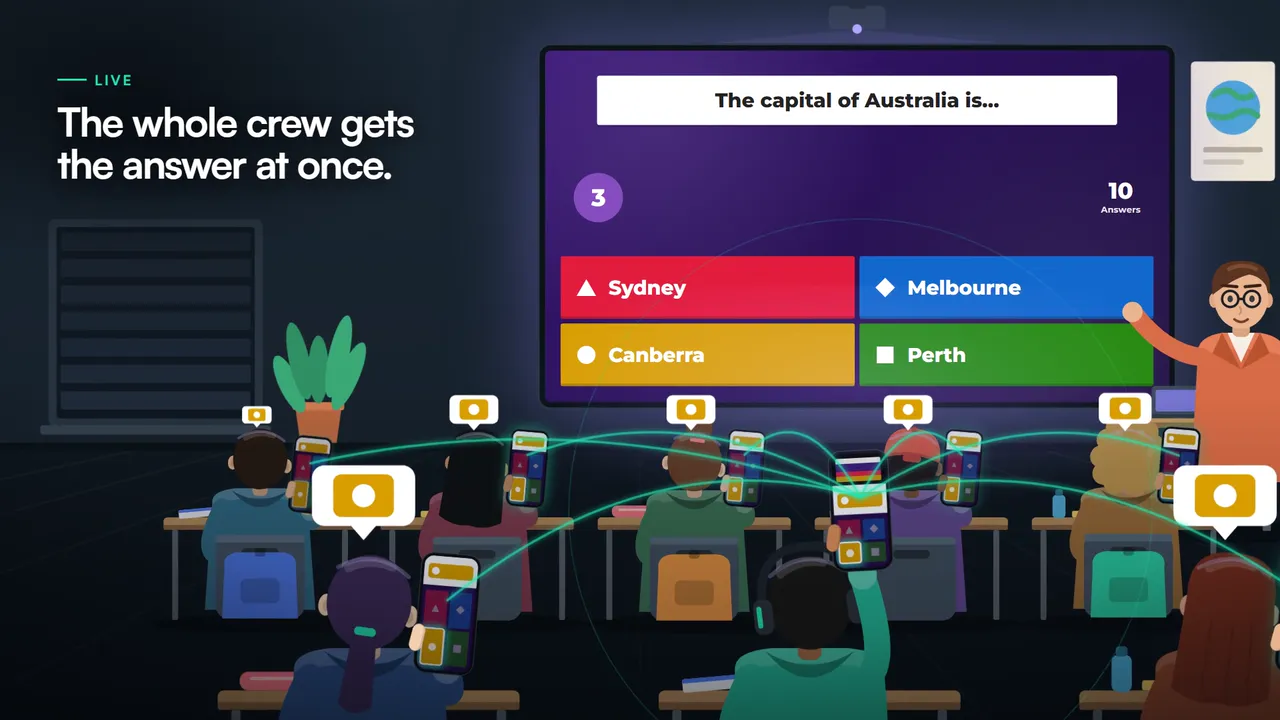
One person scans. The whole crew gets the hint.

Not everyone has to aim at the screen. One person in the class scans the question, and the rest of the crew gets the same hint on their phones at the same moment. They do nothing: the tile simply shows up.

  1. One phone watches the screenEveryone else can hold their phones the usual way.
  2. The hint reaches everyone at onceThe same tile appears for every person in the crew.
  3. Everyone taps on their own phoneYou score on your own game account, as always.
A classroom: one student scans the screen with a phone and the hint appears on the phones of classmates
Self-paced · Chrome extension

Self-paced Kahoot: the Chrome extension marks the answer.

In kahoots you play on your own, the question is on your screen. The Chrome extension reads it and marks the correct answer: a frame on the tile, a hint by the field, or the order in a puzzle.

Three steps to the answer

01

Add Quizonator to Chrome

Install the extension from the Chrome Web Store and sign in to your account.

02

Open a self-paced kahoot

An assignment from your teacher, a challenge, solo play or study mode: in all of them the question is on your own screen.

03

See the marked answer

In Default mode the correct tile gets a green frame, and you tap it yourself. One question uses one answer from your plan.

In a live game the question is on the classroom screen, not on yours. That is where the app with the camera works. Kahoot live in the app

Kahoot: app or extension? It depends on how you play.

One account works in both. Pick what fits the game mode.

Game modePhone appChrome extension
Live game: question on the classroom screenyesthe camera reads the screennothe question is not on your screen
Self-paced assignment or challengeyesyes
Solo, study mode and flashcardsyesyes
Hint for the whole crewyesone person scansno
Answers used from your planlive with the camera 2 answers per question through November 15, 2026, then 5; without the camera 11 per question
PlanLive Kahoot: PRO and PRO+FREE, PRO and PRO+
DeviceiPhonecomputer with Chrome

Which Kahoot questions Quizonator supports

Kahoot has several question types. Quizonator supports the ones that have a correct answer.

Supported

  • Quiz with one answer
  • Quiz with several answers
  • True or false
  • Type answer
  • Puzzle (put in order)
  • Slider

In testing

  • Pin answer on an image

Skipped

  • Poll
  • Word cloud
  • Slide

They have no correct answer, so there is nothing to hint.

Kahoot in Quizonator: beta, cost and limits

Live with the camera: PRO and PRO+, 2 answers per question

Kahoot in the Chrome extension, including solo play, works on FREE, PRO and PRO+. Live Kahoot is only available on iOS, in PRO and PRO+. Android does not support Kahoot yet. In Live mode one question uses 2 answers per question through November 15, 2026, then 5. Without the camera, that is in the extension and in the solo modes of the app, a question uses one answer. Answers from a link are free.

The hint from the screen takes several seconds

The app has to read the question from the screen and analyze it. Glare, a long distance from the screen or a very short timer can make the hint arrive late.

Live games: the app only

The extension reads questions from your own screen, so it works in self-paced kahoots. In a live game the question is on the classroom screen and a phone camera is needed.

AI makes mistakes

A hint is not a guarantee. Mistakes are more likely with image questions or blurry text.

Camera frames stay on your phone

The app reads the question and the answers on your phone. The text it read is sent for analysis, and for image questions a crop of that image. The app taps nothing in Kahoot and sends nothing to the game.

Security and privacy

Kahoot is in beta

This is the first version of Kahoot in Quizonator, and we keep improving it. Tell us what works for you and what does not: every note helps us make it better.

Write to us

Kahoot: frequently asked questions

The essentials before your first quiz. Choose a question to see the answer.

Check answers from a linkCompare plans
How do I get Kahoot answers?

There are three ways. If you have the quiz link or the quiz ID, paste it at the top of this page and see the correct answers for free. In a live game the Quizonator app reads the question from the classroom screen with your phone camera. In self-paced kahoots the Chrome extension marks the answer.

How do I find a Kahoot quiz link or quiz ID?

A quiz link looks like this: create.kahoot.it/details/… or kahoot.it/solo?quizId=…. The quiz ID is the long code in that address: the part after “quizId=” or after “/details/”. You can paste the whole link or the ID alone into the field on this page.

Can I get the answers from a game PIN alone?

No. A PIN lets you into a live game, but it does not identify the quiz. In that game use the app: enter the PIN in Quizonator and point your phone at the classroom screen.

Can I get Kahoot answers on a phone?

Yes. The link field works in a phone browser, and in a live game the Quizonator app for iOS reads the question from the classroom screen with the camera and shows the right tile.

Is there a Kahoot extension for Chrome?

Yes, in self-paced kahoots: assignments, challenges, solo play and study mode, that is, whenever the question is on your own screen. In a live game the question is on the classroom screen, so the app with the camera is needed there.

How many answers does Kahoot use?

It depends on the mode. In a live game, when the app reads the question from the classroom screen with the camera, one question uses 2 answers per question through November 15, 2026, then 5. Without the camera, that is in the Chrome extension and in the solo modes of the app, one question uses one answer. Kahoot in the Chrome extension, including solo play, works on FREE, PRO and PRO+. Live Kahoot is only available on iOS, in PRO and PRO+. Android does not support Kahoot yet. Answers from a link are free and do not use your plan.

Does Kahoot work on the FREE plan?

Yes. Kahoot in the Chrome extension, in self-paced quizzes and solo play, works on FREE, PRO and PRO+. Each question uses 1 answer from your allowance. Live Kahoot with the camera is only on iOS in PRO and PRO+. Answers from a quiz link on this page are free and do not use your allowance.

Does Kahoot work in the Android app?

No. Kahoot in the app is currently available only on iOS. On a computer the Chrome extension also works for self-paced and solo quizzes. Android does not support Kahoot yet.

More questions (12)
What if the link shows no answers?

Not every quiz shares its key. Then AI gives you the hint during the game: the Chrome extension for questions on your own screen, or the app, also from the classroom screen.

What is the difference between the app and the Chrome extension?

The app runs on your phone in every Kahoot mode, and only the app reads the question from the classroom screen in a live game. The extension runs in Chrome on a computer in kahoots you play at your own pace: assignments, challenges, solo play and study mode.

Does everyone in the class have to scan the screen?

No. One person is enough. The rest of the crew gets the same hint on their phones, live.

How fast does the hint from the screen appear?

Usually several seconds after the question shows up on the screen: the app has to read it and analyze it. With a very short timer it may not make it.

Does the app tap the answer for me?

No. It shows which tile it considers correct and marks it on the game screen. You tap it yourself.

Which Kahoot questions are supported?

Quiz with one or several answers, true or false, type answer, puzzle and slider. Pin answer on an image is in testing. Polls, word clouds and slides are skipped because they have no correct answer.

Is the camera image sent anywhere?

Camera frames stay on your phone. The text of the question and answers is sent for analysis, and for image questions a crop of that image.

Does the camera preview have to stay on screen?

No. You can hide it with one tap. The app keeps reading the screen, and only the game and a short hint stay visible.

Is Quizonator a Kahoot bot?

No. A bot floods a game with fake players. Quizonator does not do that: it shows you the correct answer, from the key of the quiz when you have its link, or from AI during the game.

Is this a Kahoot hack or cheat?

Quizonator breaks nothing and changes nothing in Kahoot. It reads what can be seen: the key of a quiz from its link, the question on your own screen, or the question on the classroom screen through your phone camera. Use it in line with the rules of your school or university.

Is Kahoot in Quizonator finished?

It is a beta. It works, but we keep improving it and welcome feedback.

How do I start?

Got the quiz link or the quiz ID: paste it at the top of this page. Live game: download the Quizonator app for iOS, open Kahoot, enter the PIN and point your phone at the classroom screen. Self-paced kahoot on a computer: add the extension to Chrome.

Quizonator also works on other platforms

Moodle, Testportal, Blooket, Forms and other platforms are covered by the Chrome extension and the same app. One account works everywhere.

Play your next Kahoot with Quizonator.

Live with the app, self-paced with the extension, and free with a link.

Kahoot! is a trademark of Kahoot! AS. Quizonator is not affiliated with or endorsed by it. Use the tool in line with the rules of your school or university.